Documentation
Kernel performance — CachyOS/BORE vs stock Fedora
Margine's one structural difference from Bluefin DX is the kernel: a signed CachyOS build with the BORE scheduler instead of the stock Fedora kernel. That is also the one thing you can measure cleanly. This page is the methodology and the honest results — what the tests are, why they are a fair way to compare two kernels, what the numbers say, and what they actually mean when you are using the machine.
The one-line claim
⚡ Snappier under load. On the same laptop, Margine's CachyOS/BORE kernel
does up to ~1.8× the scheduling throughput and 40–55% lower median /
average scheduling latency than the stock Fedora kernel — at a small cost to
worst-case tail latency. Higher is better; every bar above the 1.00× line is
Margine ahead.
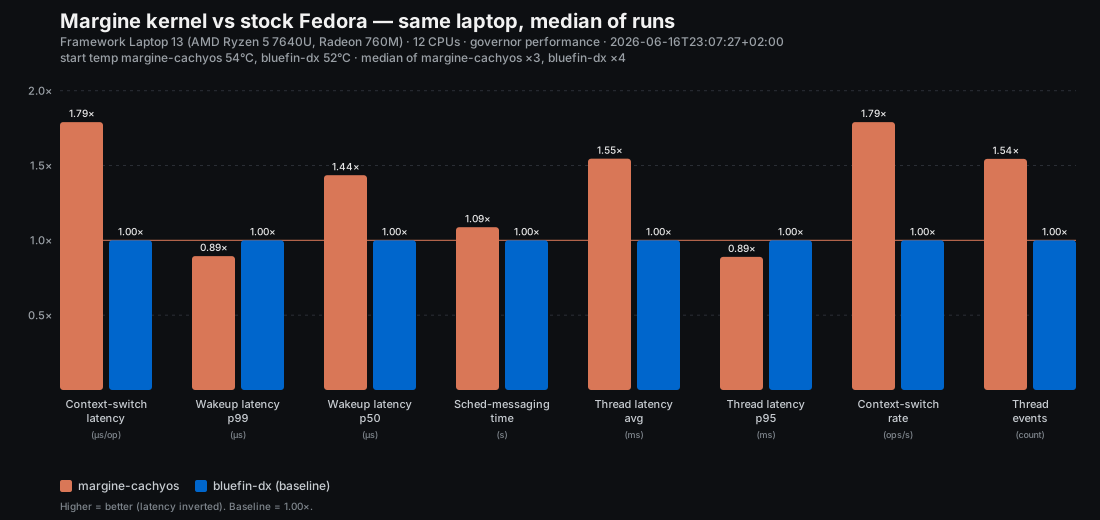
Everything below explains how that chart was produced and how much to trust it.
The raw per-run data and the script that drew the chart are committed in the
build repo under
tools/bench/results/2026-06-16/ —
you can reproduce it yourself.
Why measure the kernel
Margine is Bluefin DX plus a curated set of deltas. Almost all of those deltas (GNOME settings, the app set, tiling) don't change raw performance — they change ergonomics. The one change that can move a benchmark is the kernel: Margine replaces the stock Fedora kernel with a CachyOS build that carries the BORE scheduler (Burst-Oriented Response Enhancer) and a batch of upstream-pending performance patches.
So the only fair, meaningful question is: with the rest of the system held identical, does the CachyOS/BORE kernel schedule work faster than the stock Fedora kernel? That is exactly what we test.
What the benchmarks measure
A desktop feels "fast" mostly because of the scheduler — the part of the
kernel that decides which task runs next and how quickly a woken-up task gets the
CPU. We measure that from four angles, all under a background CPU load
(stress-ng saturating half the cores) because an idle machine tells you
nothing about how it behaves when you are actually using it.
| Benchmark | What it exercises | Why it matters to you |
|---|---|---|
| schbench (wakeup latency) | How long a just-woken task waits before it runs, under load | The single best proxy for "does the UI respond instantly when something is busy in the background" |
| perf bench sched pipe | Round-trip context-switch latency / rate between two tasks | Cost of two processes talking — pipelines, IPC, shell, compositor ↔ apps |
| perf bench sched messaging | Many tasks exchanging messages (the packaged hackbench stand-in) | Throughput when lots of processes are active at once |
| sysbench threads | Throughput + latency under heavy thread contention and mutex churn | Multi-threaded apps fighting over locks — builds, browsers, media tools |
These are standard, widely-used kernel benchmarks, not home-grown microbenchmarks
tuned to flatter one side. The tools run inside a throwaway Fedora container
(Margine's host has no dnf), but containers share the host kernel, so every
number reflects the real booted kernel.
Why this is a fair test
A benchmark is only worth publishing if the comparison is clean. Here is what we controlled, and what we deliberately did not.
Same machine, only the kernel changes. Both sides ran on the same laptop — a Framework Laptop 13
(AMD Ryzen 5 7640U / Radeon 760M, 12 threads; the board generation is inferable from the CPU). We didn't use two computers or
two installs — we switched ostree deployments on one install (Margine ⇄
ghcr.io/ublue-os/bluefin-dx:stable). Same userspace, same Mesa, same
everything; the kernel is the only variable. That is the cleanest A/B you can do.
Median of four runs, not a lucky single shot. Each system was measured four times and we report the median per metric. A single run can be thrown off by a stray background task — and indeed one of our early Margine runs was a 2× outlier on one metric; the median absorbs it (it is documented and excluded in the results README). The comparison tool also flags any metric that swings more than 25% across runs, so instability can't hide.
Thermal parity. This is a thin-and-light laptop: under sustained all-core load it hits its ~100 °C thermal limit and throttles — both kernels equally. A run that starts hotter throttles sooner and looks worse, so we ran the four runs per side at varied starting temperatures and matched the median start temperature (Margine ~51 °C, Bluefin ~52 °C). The tool refuses to call two runs comparable if their start temps differ by more than 8 °C.
Governor pinned, scheduler honest. CPU governor set to performance on both
sides; no scx userspace scheduler loaded, so this is stock BORE vs stock
Fedora EEVDF/CFS — not a hand-tuned config.
What we did not control (on purpose): the exact kernel point version.
Margine ran 7.0.12-cachyos1, Bluefin 7.0.8 — each distro's current stable
kernel. They are different kernel trees and can't be version-matched; that is
the product difference. The 4-patch gap is bug-fix backports, not a performance
rework, and is far too small to explain the gaps you see below.
The results (median, this hardware)
| Metric | Margine (CachyOS/BORE) | Stock Fedora | Δ |
|---|---|---|---|
| Context-switch latency | 4.45 µs/op | 7.97 µs/op | ~1.8× faster |
| Context-switch rate | 224k ops/s | 125k ops/s | +79% |
| Thread throughput | 88k events | 57k events | +54% |
| Thread latency (avg) | 4.1 ms | 6.3 ms | 55% lower |
| Wakeup latency (p50) | 2.08 ms | 2.98 ms | 43% lower |
| Sched-messaging time | 2.99 s | 3.25 s | 9% faster |
| Wakeup latency (p99, tail) | 12.0 ms | 10.7 ms | ~11% higher |
| Thread latency (p95, tail) | 23.9 ms | 21.3 ms | ~11% higher |
The shape is consistent and, importantly, not "wins everything." CachyOS/BORE is dramatically better at the common case — throughput and median/average latency — and slightly worse at the tail (the worst ~1–5% of events). That is the textbook BORE trade-off, and the fact that it shows up here is a sign the measurement is honest rather than cherry-picked.
What it means in real use
Benchmarks are proxies. Here is the translation to daily desktop life:
- Context-switch ~1.8× faster + 54% more thread throughput → when the machine is busy — a compile running, a dozen browser tabs, a video encoding — apps keep getting CPU time promptly instead of stuttering. This is the single biggest everyday win.
- 43–55% lower median/average latency → clicks, scrolls, keypresses and window animations stay responsive while that background work happens. The "the whole desktop hitches when something heavy starts" feeling is what BORE is designed to kill.
- ~11% higher tail latency (p95/p99) → very occasionally a worst-case event waits a little longer than on stock Fedora. In practice this is invisible for interactive desktop use; it would only matter for hard-real-time or strict latency-SLA workloads, which a creator laptop is not.
Net: for an interactive desktop under load — which is exactly when you notice slowness — the CachyOS/BORE kernel is meaningfully snappier, with a trade-off that doesn't affect normal use.
Honest caveats
- One machine. These numbers are for this Framework Laptop 13 (Ryzen 5 7640U). Direction (CachyOS faster on common-case scheduling) generalises well; the exact percentages will differ on other hardware.
- Thermally limited. Both kernels throttled at ~100 °C, so the absolute numbers are conservative. The relative gap is fair (both hit the same wall).
- Synthetic, not your app. These measure the scheduler, not GIMP or a game. They predict responsiveness under load well; they are not a frames-per-second or render-time benchmark.
- Self-measured, fully transparent. We are the project being measured — so the raw data, the exact tool, and the one excluded outlier are all published. Re-run it and check.
Reproduce it
On a Margine machine (and again after switching to another OS on the same
laptop), from the build repo's tools/bench/:
# governor on performance, AC plugged in, let it cool to a similar temp first
BENCH_LABEL=margine-cachyos BENCH_JSON_OUT=run.json ./margine-bench-kernel.sh
# ...repeat on each OS, then:
./margine-bench-compare.py *margine*.json *bluefin*.json --out-prefix perf-kernel
The script records the kernel, governor, and start/end CPU temperature in every result, refuses to emit a result with no metrics, and warns on thermally non-comparable or high-variance runs — so a sloppy run can't quietly become a marketing number.