Documentation
CPU schedulers
Margine's CachyOS kernel boots with BORE — a good place to stay. But the kernel also ships sched_ext: whole CPU schedulers delivered as sandboxed BPF programs you can start, swap, and stop at runtime. Margine includes six of them plus a GUI picker. Switching takes about two seconds, needs no reboot, and is always one click from undone — if a scheduler ever misbehaves, the kernel ejects it and falls back to BORE on its own.
What a CPU scheduler does (30-second version)
At any moment your machine has more runnable tasks than CPU cores. The scheduler decides which task gets which core, for how long, and who waits. With an idle desktop you'd never notice it; the moment there's contention — a game plus a compile plus forty browser tabs — the scheduler is the difference between "everything stays smooth" and "the cursor hitches while the build wins".
The default policy optimises for a balance of fairness and throughput. Alternative policies deliberately trade some throughput for lower latency on the tasks you're interacting with. Neither is "better" — they're tuned for different workloads, which is exactly why being able to swap them is useful.
sched_ext — schedulers as loadable programs
sched_ext (scx) is a kernel framework that lets a complete scheduling policy live in a BPF program instead of being compiled into the kernel. The kernel verifies the program before loading it, and a runtime watchdog ejects any scheduler that stalls a runnable task, reverting to the in-kernel default automatically. That safety net is what makes experimenting on your daily machine reasonable.
On Margine this is opt-in: the scx_loader service stays off and BORE (the CachyOS kernel's built-in default) runs until you explicitly pick a scheduler. Picking one enables the service, so your choice persists across reboots until you choose Off.
The shipped schedulers, and when to pick which
- Off (the default) — no BPF scheduler; the kernel runs BORE, CachyOS's burst-oriented tuning of the stock scheduler. Best all-rounder; switch away only on a measured need.
- scx_lavd — "Latency-criticality Aware Virtual Deadline", developed with the Steam Deck in mind. Detects latency-critical tasks by their wake/wait patterns and deadline-boosts them. Pick for: gaming, especially a game with background load.
- scx_bpfland — prioritises interactive tasks, identified by voluntary context switches. Pick for: a desktop that stays fluid during compiles and exports.
- scx_rusty — multi-domain general-purpose scheduler with a Rust userspace load balancer. Pick for: throughput-leaning mixed use, big multi-CCD CPUs.
- scx_flash — EDF-based; predictable, consistent latency over raw throughput. Pick for: audio work and other low-jitter needs.
- scx_cosmos — newer general-purpose scheduler focused on low overhead.
- scx_rustland — the policy runs fully in Rust userspace; the experimentation flagship of the scx project.
Rule of thumb: gaming → lavd · busy desktop → bpfland · audio → flash · unsure → Off.
Switch with the GUI — Margine CPU Scheduler
Open Activities and type "scheduler". The Margine CPU Scheduler launcher opens a picker listing all six schedulers plus Off and the current status. Right-click the launcher icon (in Activities or the dock) for quick actions that jump straight to a specific scheduler without opening the picker.
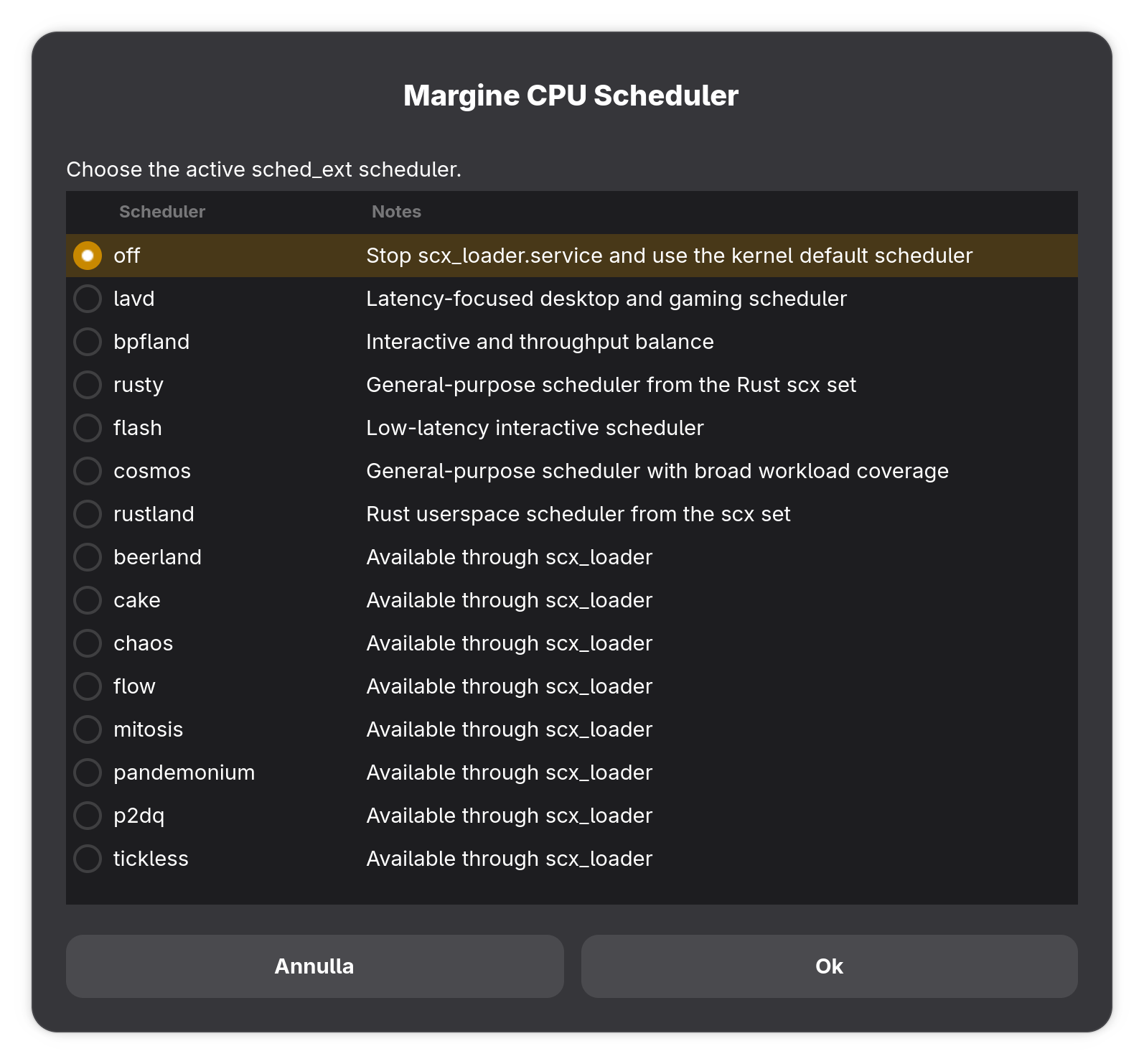
The GUI drives the same ujust recipe as the terminal path below, so everything it does is inspectable and scriptable.
Switch from the terminal
ujust margine-scheduler            # current status + available schedulers
ujust margine-scheduler lavd       # start (or switch to) scx_lavd
ujust margine-scheduler bpfland    # …same for any of the six
ujust margine-scheduler off        # stop scx_loader, back to BORE
One level lower, scxctl talks to the scx_loader service directly:
scxctl list                        # schedulers the loader knows about
scxctl get                         # what's running now
scxctl start --sched lavd          # start one
scxctl switch --sched bpfland      # swap live
scxctl stop                        # stop it
Verify what's actually live:
cat /sys/kernel/sched_ext/state    # "enabled" when a BPF scheduler runs
cat /sys/kernel/sched_ext/root/ops # which one
journalctl -u scx_loader -e        # the loader's log
Power profiles (tuned) and the scheduler
Three different knobs compose here, and it helps to keep them straight: tuned / tuned-ppd (GNOME's Power panel) sets the CPU governor and platform power policy; GameMode flips the governor per game; sched_ext decides which task runs on which core. They don't conflict — they stack.
One Margine-specific wrinkle: when you change the power profile, Margine's tuned profiles also tell a running scx scheduler to re-evaluate its power mode (scxctl switch -m auto), so the scheduler follows the platform power state. With no scheduler running, that step is a no-op.
If you're benchmarking schedulers, pin the Performance profile first — otherwise governor changes pollute your A/B comparison.
Testing the difference honestly
Switching is instant, so an A/B test costs minutes. The rules are the usual ones: change one variable at a time, fix the tuned profile, use a repeatable workload.
- Gaming: run with
MANGOHUD=1 %command%and judge the frametime graph and 1% / 0.1% lows, not average FPS — latency schedulers mostly buy you fewer spikes, not more frames. - Desktop feel: start a heavy background load (
stress-ng --cpu $(nproc)or a kernel build), then judge typing and scrolling latency in your editor and browser. - Throughput: time a repeatable build with
hyperfine. Expect latency-oriented schedulers to cost a few percent of compile time — that's the trade, working as intended. - Audio: watch the xrun count in
pw-topat a low PipeWire quantum.
And a placebo warning: if you can, have someone else switch (or not) while you're not looking. "It feels snappier" is the least reliable benchmark in computing.
Troubleshooting
- Scheduler won't start →
journalctl -u scx_loader -eusually says why. - Stutter after switching →
ujust margine-scheduler offand you're back on BORE in two seconds. - The kernel ejected it (
dmesg | grep -i sched_ext) → that's the safety net working. Report it at sched-ext/scx. - Sanity check the stack →
margine-validate-cachyos-kernel.