Margine
BUILT ON BLUEFIN DX · FEDORA SILVERBLUE 44

An immutable Linux desktop, built for creators.

Bomb-proof by design, fast on the CachyOS kernel, with a GNOME re-wired for tiling, every codec and driver already in place, and a curated set of creator tools that make it ready for work from minute one.

Verify integrity: SHA256SUMS then sha256sum -c SHA256SUMS

Base
Bluefin DX
Kernel
CachyOS · signed
Desktop
GNOME · tiling
License
Apache-2.0

Snappier under load

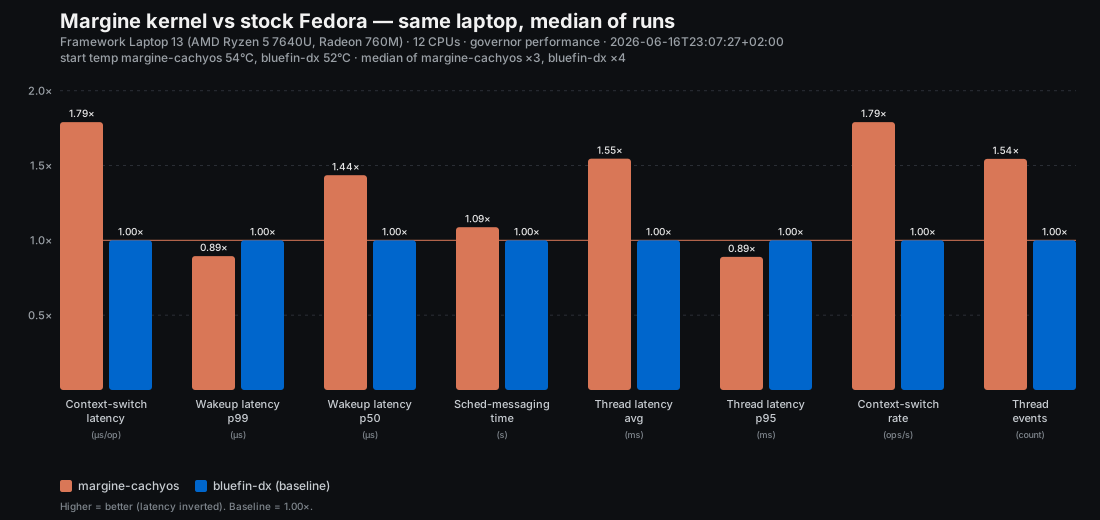
Margine's signed CachyOS/BORE kernel does up to ~1.8× the scheduling throughput and 40–55% lower median / average latency than the stock Fedora kernel — measured on the same laptop.

Margine CachyOS/BORE kernel vs stock Fedora kernel — scheduler benchmark, median of runs

MEDIAN OF 4 RUNS · FRAMEWORK LAPTOP 13 · GOVERNOR PERFORMANCE · how this was measured →

01 — What you get

A finished desktop, not a starter kit.

Everything here is on from the first boot — no post-install checklist, no hunting through settings. Open Details on any card for the specifics, and most link into the docs for the full story.

A faster kernel, Secure Boot still on

CachyOS kernel with the BORE scheduler — lower desktop latency, and Secure Boot never has to come off.

Details

Mainline kernel from the bieszczaders/kernel-cachyos COPR. The kernel image and every module are signed at build time with the Margine MOK and enrolled into shim on first boot — so you keep Secure Boot on without disabling anything.

Read more

Swap the CPU scheduler, live

Six sched_ext schedulers in the base image — switch in two seconds, no reboot.

Details

scx_lavd for gaming, scx_bpfland for busy desktops, scx_flash for audio, and more — from the GUI picker or `ujust margine-scheduler`. Off returns to BORE; if a scheduler misbehaves the kernel ejects it on its own.

Read more

Local AI, one command

`ujust margine-ai` adds Alpaca — chat with local LLMs fully offline, sandboxed, and removable.

Details

Opt-in and 100% Flatpak — nothing is layered onto the host. Alpaca bundles its own Ollama backend; pick a model on first launch (llama3.1:8b general, qwen2.5-coder:7b for code, phi3.5:3.8b for CPU-only). Everything runs on your machine; `ujust margine-ai-remove` undoes it. A RamaLama CLI path is printed for power users.

Read more

Complete media stack from first boot

Proprietary codecs, hardware video acceleration, and browser DRM all work out of the box.

Details

Mesa freeworld, full ffmpeg (H.264, HEVC, AAC, MP3, AC3, DTS), VA-API/VDPAU hardware acceleration, and the GStreamer plugin set. DRM in Firefox and Chromium works with no extra setup.

Scroll speed, finally a setting

A real scroll-speed control for touchpad scroll and pinch — the slider GNOME never shipped.

Details

wsf (wayland-scroll-factor) is preloaded into GNOME Shell: one factor for scroll and pinch, set with `wsf-gui` or `wsf set 0.7`, applied live to every app. Defaults to 1.0 — byte-for-byte stock until you touch it.

Read more

GNOME with a tiling workflow

Stock GNOME plus binary-tree auto-tiling and Hyprland-style keybindings.

Details

o-tiling preinstalled and enabled. Super+1..0 for workspaces, Super+Arrow to move focus, Super+Shift+Arrow to move windows, Super+Return for the terminal.

Read more

Desktop ready at first login

37 curated apps are already there the moment you log in — no first-boot wait.

Details

Zen, Thunderbird, Bitwarden, LibreOffice, the GNOME suite, Pinta, Audacity, EasyEffects, Reaper, g4music, Blanket, Fragments, Apostrophe and more — baked into the system at install time. Four heavy creatives (GIMP, Inkscape, darktable, OBS Studio) arrive in the background within 5–15 min. VS Code is inherited from Bluefin DX.

Read more

Laptop speakers, rescued

A system-wide EQ / compressor / limiter chain so cheap laptop speakers sound right.

Details

EasyEffects preinstalled, sitting between every app and your output device, with per-device preset autoload and an instant bypass A/B. A hand-tuned preset for the Framework 13's stock speakers is on its way to the image.

Read more

Immutable filesystem, atomic upgrades

/usr is read-only; updates stage as a new deployment and roll back in one command.

Details

Updates pull a new OCI image and stage it as a new deployment; the previous one stays on disk. `bootc rollback` returns to it at the next reboot.

Read more

Verified build pipeline

A release that doesn't boot in a VM never reaches your computer.

Details

Every release passes static image inspection and a QEMU smoke-boot, and only then gets promoted to :stable.

Read more

Disk encryption and TPM2

One-checkbox LUKS2 full-disk encryption at install — and we recommend you tick it.

Details

Set a strong passphrase; TPM2 auto-unlock can be enrolled after install via systemd-cryptenroll, keeping the passphrase as recovery.

Read more

The handbook ships inside the OS

The full documentation is baked into the image and works offline.

Details

Refreshed daily in the background; the Margine Documentation launcher opens the local copy instantly — aeroplane mode included. The website and the offline copy are the same content.

Read more

Distributed downloads

ISO and qcow2 on the Internet Archive as both torrent magnets and direct HTTP.

Details

SHA256SUMS published alongside. Same bytes, two transports.

Read more

02 — A look

The shell, as shipped.

Tiling — Hyprland-flavoured GNOME
Activities — searchlight
Lock screen

03 — Install

Fresh install or rebase.

Margine ships a single ISO. Rebase remains available for existing Bluefin DX systems. Gaming is one command on top — ujust margine-gaming after first boot installs the gaming stack (gamescope, vkBasalt, Steam, Lutris, Heroic, Bottles, ProtonPlus, RetroArch).

Recommended

Option A — Install from ISO

The ISO boots a full live GNOME session with Margine already in it — try the desktop first, then install from the launcher (Anaconda Web UI). Validated end to end as of 2026-06-11.

  1. 1Download the ISO (Torrent recommended). Verify against the published SHA256SUMS.
  2. 2Boot the ISO into the live session — a full Margine desktop you can try before touching the disk. When ready, start the installer from the desktop.
  3. 3Install: UEFI recommended, Btrfs (the default), and tick the LUKS2 encryption box (strongly recommended). Reboot when it completes — you're on Margine.
  4. 4With Secure Boot on you trust Margine's kernel key once, at the ISO boot menu: Enroll Secure Boot keyEnroll key from disk EFI/MOK.der → verify the fingerprint → Yes → reboot. No password on that path, and you won't see it again. Full walkthrough: /docs/install-iso.
  5. 5Apply user state once: ujust margine-bootstrap
From Bluefin

Option B — Rebase from Bluefin DX

Install Bluefin DX stable first, then switch to Margine without reinstalling. This keeps the fresh-install path on upstream's currently validated ISO while Margine's own ISO finishes hardening.

rpm-ostree rebase \
  ostree-image-signed:docker://\
  ghcr.io/daniel-g-carrasco/margine:stable
systemctl reboot

After reboot: enroll the Margine MOK via the blue MOK Manager screen (passphrase margine-os full walkthrough), then ujust margine-bootstrap. Why this path is first right now.

Post-install verification

$ mokutil --sb-state # SecureBoot enabled
$ uname -r # 7.0.x-cachyos*.fc44.x86_64
$ margine-validate-atomic-layout
$ margine-validate-cachyos-kernel

04 — Gaming

Gaming, one command away.

Two ways to game — both opt-in, both reversible, and you can switch later. Pick by how seriously you play. Controllers, launch-option recipes, and the per-tool guide live in the gaming docs.

Flatpak · the default

Most people
$ ujust margine-gaming
$ systemctl reboot
  • Sandboxed — every launcher carries its own runtime (32-bit included).
  • Zero extra time on each update.
  • Steam · Lutris · Heroic · Bottles · Protontricks · ProtonPlus · RetroArch.

Best for the occasional gamer. Roll back: ujust margine-gaming-remove.

Native · RPM-layered

Daily / competitive
$ ujust margine-gaming-native
$ systemctl reboot
  • Native RPMs — maximum Proton/Wine compatibility.
  • Anti-cheat (EAC / BattlEye), VR, and controllers integrate without sandbox quirks.
  • Mesa always matches the system — the 32-bit stack is baked into the image.
  • Costs ~30-60s extra per update to re-apply the layer.

Best if you game daily or play anti-cheat titles. Roll back: ujust margine-gaming-native-remove.

Launchers & runtimes

Performance & overlay (RPM layer · requires reboot)

gamescopeMangoHudvkBasaltGameModegoverlaysteam-devicesinput-remappertuned + tuned-ppdrom-properties

05 — Technical reference

What's inside.

Base image
Bluefin DX (stable) — Fedora Silverblue 44
Kernel
CachyOS mainline · sbsign + sign-file · MOK first-boot enroll
Update orchestration
uupd.timer daily (auto: bootc / rpm-ostree if layered) · ujust margine-update · bootc rollback
Desktop
GNOME Shell · o-tiling · Hyprland-style bindings
CPU schedulers
BORE by default · sched_ext set in the base image (scx_lavd / bpfland / rusty / flash / cosmos / rustland) · GUI picker in Activities · `ujust margine-scheduler`
Input
wsf (wayland-scroll-factor) preloaded into gnome-shell — touchpad scroll speed and pinch sensitivity as a real setting via `wsf-gui` / `wsf set`, inert at factor 1.0 until you change it
Container tooling
podman · docker · distrobox · toolbox
Encryption
LUKS2 (one checkbox, recommended) · optional TPM2 via systemd-cryptenroll
Preinstalled apps
37 curated Flatpaks baked at install time + 4 heavy creatives in the background (GNOME core utilities, productivity, creative, audio). Gaming clients install on top via `ujust margine-gaming`.
Image
margine:stable — single OCI image. The opt-in gaming layer (gamescope + vkBasalt + Steam/Lutris/Heroic/Bottles/Protontricks/ProtonPlus/RetroArch) ships via the `ujust margine-gaming` recipe.
CI
build → smoke-boot QEMU → :stable promotion · Anaconda ISO + IA upload pipeline runs on push to main.
Distribution
Internet Archive · Torrent + HTTP · cosign signed by digest